Validate Returns Easily
Allow your buyers to apply for device returns (if eligible) directly via Secqrd.
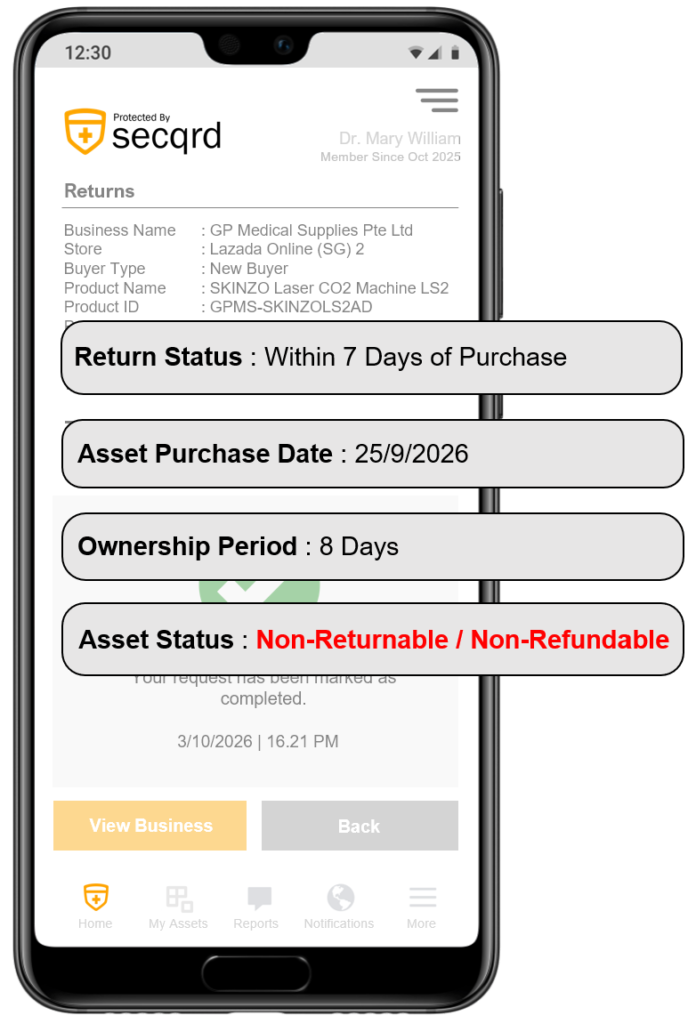
Set Return Eligibility
Set your device return and refund settings with the following customisation specific to a product sold:
- Return Conditions
- Return Policy
- Return Period
- Return Location
Enable self-service checks by your buyers using Secqrd, without having to contact your business.
Reduce Emails & Calls
Introduce automation in your processes.
Self-Service Steps for Returns
Allow your buyers to self-check their eligibility for returns based on purchasing data via Secqrd.
Step 1
Buyer selects a registered device in their account.
Step 2
Buyer checks the status to proceed to Step 3.
Step 3
If eligible, return address is displayed to buyer.
Step 4
Submission of slip after postage to address.
Types of Returns
- Incorrect Model
- Incorrect Version
- Incorrect Colour
- Incorrect Size
- Incorrect Accessories
Features
- Customised return policy unique to device
- Multiple return collection centre addresses
- Set return conditions unique to device
- Collect slips in image / PDF format
- Set condition for refund eligibilities
Easily include an upgrade voucher to buyers
Send an upgrade voucher to buyers who are ineligible for returns
$50 Discount
On any new model
Get Secqrd
Your existing buyer database has its own untapped revenue potential.
Connect with them using Secqrd today.
- Upgrade your after-sales engagement
- Provide better warranty support
- Upsell with add-ons
- Increase buyer lifetime value (LTV)
No credit card needed